 Centro de ayuda
Inventory listings
To select the Inventory Layout, follow these steps:
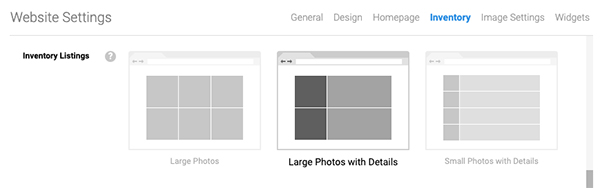
- In the back-end menu, go to Website › Settings › Inventory › Inventory Listings.
- Select a layout from the available options.
- Click the Save Changes button on the bottom left.
Large Photos
The website inventory page will display large photos with minimal information.
Large Photos with Details
The website inventory page will display large photos with details.
Small Photos with Details
The website inventory page will display small photos with details.
|
|
Changing the Inventory Listings will change the way the inventory displays on the Inventory page.
|
