 Centro de ayuda
Manually Posting to Craigslist
Posting a vehicle manually to Craigslist is easy, here’s how:
- In the back-end menu, go to Marketing › Craigslist Poster.
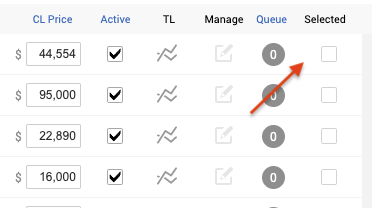
- Make sure to select all the vehicles that you want to post by marking the empty boxes on the right.
- In the lower left, choose your Post Location (The location where you want to post your vehicles)
- Click on Post to Craigslist. (Before posting make sure that the subject and price are correct. And if you do make any changes make sure to save changes and then post.)
*In order for you the be able to post you need to have posts and credits.
