 Centro de ayuda
Text Us Feature

The Text Us Feature that shows on your website at the bottom right corner is automatically enabled, if you want to disable it you can do that by going to Admin > Phone > Settings and changing the Status
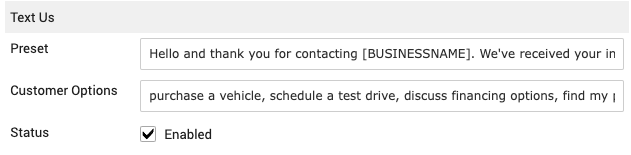
Under the Preset you can change the message customer receives once they send something
Under Customer Options you can change quick options customers can pick from instead of typing in the message
Once you are done click on Save Changes in the bottom left
*If you want to use certain tags in your preset just click on Tags In Phone System you have at the bottom of the window to see which tags you can use
