 Centro de ayuda
How to add or edit extensions?
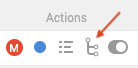
If you want to add or edit extensions just go to Admin > Phone and click on the 4th icon of the number you want to manage the extension for
If you want to add the extension, just click on the red button on the left that says Add Extension and a new window will pop up
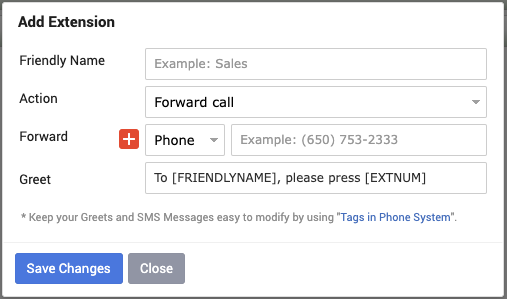
- Friendly Name - Here you add the name of the extension (For example: Sales)
- Action - Here you can pick what will the extension action be, you have 4 options:
1) Forward call - it will just forward the call to the number you want
2) Reply with SMS - if someone calls it will just send them a SMS Message you type in
3) Send to Voicemail - it will just take them straight to leave a voicemail
4) In-Browser - you can pick the user to forward the call
If you want to add multiple phone numbers to ring if the customer selects that extension you can just click on the + next to Phone and add an additional field to add another number
When you click on Phone a drop-down menu will show where you can pick between 3 options

When you choose Phone you can type in the number you want to ring, if you click on User you can select the user from the system that has a number added under their account and if you click on Group you can select which department should get those calls, for example if you pick Sales Reps anyone who has their title under Users as Sales Rep will get the call as long as their phone number is added on their account.
*You can add up to 5 different numbers and be aware that the Multi-Forward will not work if there are any sub-extensions added for that extension
If you want to edit the extension, just click on the extension you want to edit and a window will pop up where you can make the changes you want
When it comes to adding Sub-Extensions to an extension, just click on the red + all the way to the right of the extension and the process will be the same as adding the extension
If you want to delete an extension or sub-extension just click on the trash can icon all the way to the right of the extension and a window will pop up to confirm if you want to delete it or not
Whatever you do make sure to click on blue Save Changes.
If you want to add the extension, just click on the red button on the left that says Add Extension and a new window will pop up
- Friendly Name - Here you add the name of the extension (For example: Sales)
- Action - Here you can pick what will the extension action be, you have 4 options:
1) Forward call - it will just forward the call to the number you want
2) Reply with SMS - if someone calls it will just send them a SMS Message you type in
3) Send to Voicemail - it will just take them straight to leave a voicemail
4) In-Browser - you can pick the user to forward the call
If you want to add multiple phone numbers to ring if the customer selects that extension you can just click on the + next to Phone and add an additional field to add another number
When you click on Phone a drop-down menu will show where you can pick between 3 options
When you choose Phone you can type in the number you want to ring, if you click on User you can select the user from the system that has a number added under their account and if you click on Group you can select which department should get those calls, for example if you pick Sales Reps anyone who has their title under Users as Sales Rep will get the call as long as their phone number is added on their account.
*You can add up to 5 different numbers and be aware that the Multi-Forward will not work if there are any sub-extensions added for that extension
If you want to edit the extension, just click on the extension you want to edit and a window will pop up where you can make the changes you want
When it comes to adding Sub-Extensions to an extension, just click on the red + all the way to the right of the extension and the process will be the same as adding the extension
If you want to delete an extension or sub-extension just click on the trash can icon all the way to the right of the extension and a window will pop up to confirm if you want to delete it or not
Whatever you do make sure to click on blue Save Changes.
