 Help Center
How to change the main forward number?
If you need to change the number where the calls are being forwarded just go to Admin > Phone and click on the source name

You will see a field next to Main Forward where you can change the number where the calls are being forwarded to
If Multi-Forward is active just remove the number by clicking on the red minus button or if you want to change it just replace the number you want
If you have Extensions, click on the 4th icon under Actions
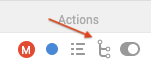
Then click on the extension where you have the number you want to change and update the Forward number or you can remove it by clicking on the red minus button if the multi-forward is active for the extension
Once you are done click on the blue button Save Changes
You will see a field next to Main Forward where you can change the number where the calls are being forwarded to
If Multi-Forward is active just remove the number by clicking on the red minus button or if you want to change it just replace the number you want
If you have Extensions, click on the 4th icon under Actions
Then click on the extension where you have the number you want to change and update the Forward number or you can remove it by clicking on the red minus button if the multi-forward is active for the extension
Once you are done click on the blue button Save Changes
