 Help Center
Updating lead status
In the back-end menu, go to CRM › Leads
Select the desired customer and go to Working Lead. You can update the lead status by clicking on Manage.
A new window will pop up and at the bottom, you can change the status to Working, Archived, or Sold.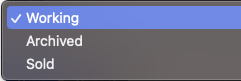
Under Working you should keep the leads you are working on, under Archived you should move the leads that are no longer interested in buying a vehicle and under Sold you should only move the leads you sold a vehicle to.
A window will pop up where you can update the lead status.
You have three statuses to choose from: Working, Archive ( for leads you didn't do the deal with ) and Closed ( for leads that you closed a deal with ).
Once you’ve changed the status, click on Save.
If you are working on a lead, you can also change the status by moving the running guy icon with a simple click and drag. When a lead first comes it will be on Pending Contact 
If a customer populated a Finance Form on the website then it will be green and on Financing
The second line is Contacted and the third line is a Test-Drive.
When you're changing the status you can also pick between Working or if there are any issues On-Hold
