 Help Center
Automations
If you want to set up your automations just go to CRM and click on the toggle icon next to Retarget (You have to be subscribed in order to be able to turn on your automations - How to Subscribe)
Once you are on the automations page you can activate on the right side the automations you would like to use
Similar Vehicles - targets customers who had an interest in similar vehicles, the system looks at vehicles that are in the same body style and price range, which varies around $3000 more or less compared to the selling price of the vehicle they were interested in. It will target them when you add a similar vehicle (Your lead needs to have a Vehicle Interest populated in the CRM in order for this automation to work)
Coming Soon became Available - targets customers who were interested in a vehicle that was set up in the system as Coming Soon, so when you switch the status from Coming Soon to Available it sends them a message (Your lead needs to have a Vehicle Interest populated in the CRM in order for this automation to work)
Price-Drop - targets customers when you drop a price on the vehicle they were interested in (Your lead needs to have a Vehicle Interest populated in the CRM in order for this automation to work)
Request Review - when you move a vehicle to sold, it will ask you to choose a lead you sold the vehicle to and once you select the lead the system will automatically send a text for them to leave a review. The link lasts for 72 hours, so the customer needs to leave a review in that time frame. You can send them a link to your Google, Facebook, Yelp, or Dealer Rater for a revive. Just make sure you have the links set up under your Dealership Settings. (Your lead needs to have a Vehicle Interest populated in the CRM in order for this automation to work)
Follow-up - you have a 2, 4, 7, and 14-day follow-up option and it targets customers who haven't replied in 2, 4, 7, and/or 14-days to try and re-engage them
Trade-In & Buyback - it targets customers who bought a vehicle a year ago and are under Sold in the CRM, to try and sell them on a new vehicle or get a trade-in
Promotion - you have 3 options, Black Friday, Cyber Monday, and Tax Season, and during those events is will message all customers advising them about the promotion with the link to your inventory
Relationship - it will target your customers with personalized text during special holidays and events, helping you maintain and build relationships with your customers. There are a couple of different options: Happy Birthday, Thanksgiving, Christmas, Mother's Day, Easter, Independence Day, Halloween, Father's Day, Saint Patrick's Day, New Year, Labor Day, Memorial Day, Veterans Day, Armed Forces Day, Columbus Day, Lunar New Year, President's Day, Cinco de Mayo, Hanukkah, Passover, Super Bowl Sunday
Service Reminder - we have 2 options, 6K Miles Service and 12K Miles Service. It reminds customers that bought a vehicle from you that the vehicle service is due
In the middle of every automations you have an icon  where if you hover over it you can see the example of how the sent message will look like
For every automation that you have active, you can check how many customers the automation reached, how many replies, and how many clicks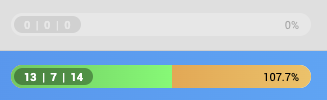
Also at the top, you can see in total how many customers you reached, how many replies, how many clicks, and your response rate. Also, you can filter it by this Month, this Week, last Month, last Week, or All Times.
*Be aware that both automations and manual retargeting uses text messages, so if you go over your limit the system will buy more texts. You can check how many texts you left if you go to Admin > Phone and in the top right corner, it will tell you have many you have each month and how much you spent so far.
*By using Retargeting feature you agree to the Terms Of Use.
